Debugging Protobuf: The Practical Stuff Nobody Tells You
I've debugged a lot of Protobuf issues. Not because I'm especially good at it, but because I've made pretty much every mistake possible. Here's what I've actually learned.
The Starting Point
When something's wrong with a Protobuf message, you need to answer one question first: what's actually in the binary?
Until you can see the data, you're guessing. The goal is always to get eyes on the decoded content as fast as possible.
Getting the Binary Out
From a gRPC API:
# With grpcurl
grpcurl -plaintext -d '{"user_id": 123}' localhost:8080 my.Service/GetUser > response.bin
From a message queue: Most queue consumers can log or dump the raw bytes. Kafka's kafka-console-consumer will give you hex output.
From browser DevTools:
Network responses with X-Grpc-Encoding: gzip are compressed—decompress first, then capture the raw bytes.
Quick Decode with a Visualizer
Once you have hex or Base64, paste it into Protobuf Visualizer. You'll see field numbers and values immediately.
Without a schema, you see field_1, field_2 instead of user_id, email. But often that's enough to spot the problem.
The Schema Route
If you have the .proto file:
protoc --decode=MyMessage myproto.proto < message.bin
This gives you semantic field names. Useful when field numbers aren't obvious from context.
JWT Debugging
JWTs use the same Base64 encoding. If you're debugging auth:
- Pull the token from the Authorization header
- Paste into the visualizer, select JWT mode
- Check the payload
Common things I find wrong:
expis in the past (clock skew or token expired)auddoesn't match your API- Missing claims that your code expects
The Three Bugs I Hit Most
1. Schema version mismatch
Field number 5 meant email in version 1 of your proto, but phone in version 2. If producer and consumer have different versions, you get garbage.
Fix: Align on one schema version.
2. Wrong wire type
You declared field 3 as int64 but encoded an int32. Protobuf will happily decode garbage.
Fix: Check your field declarations match what you're encoding.
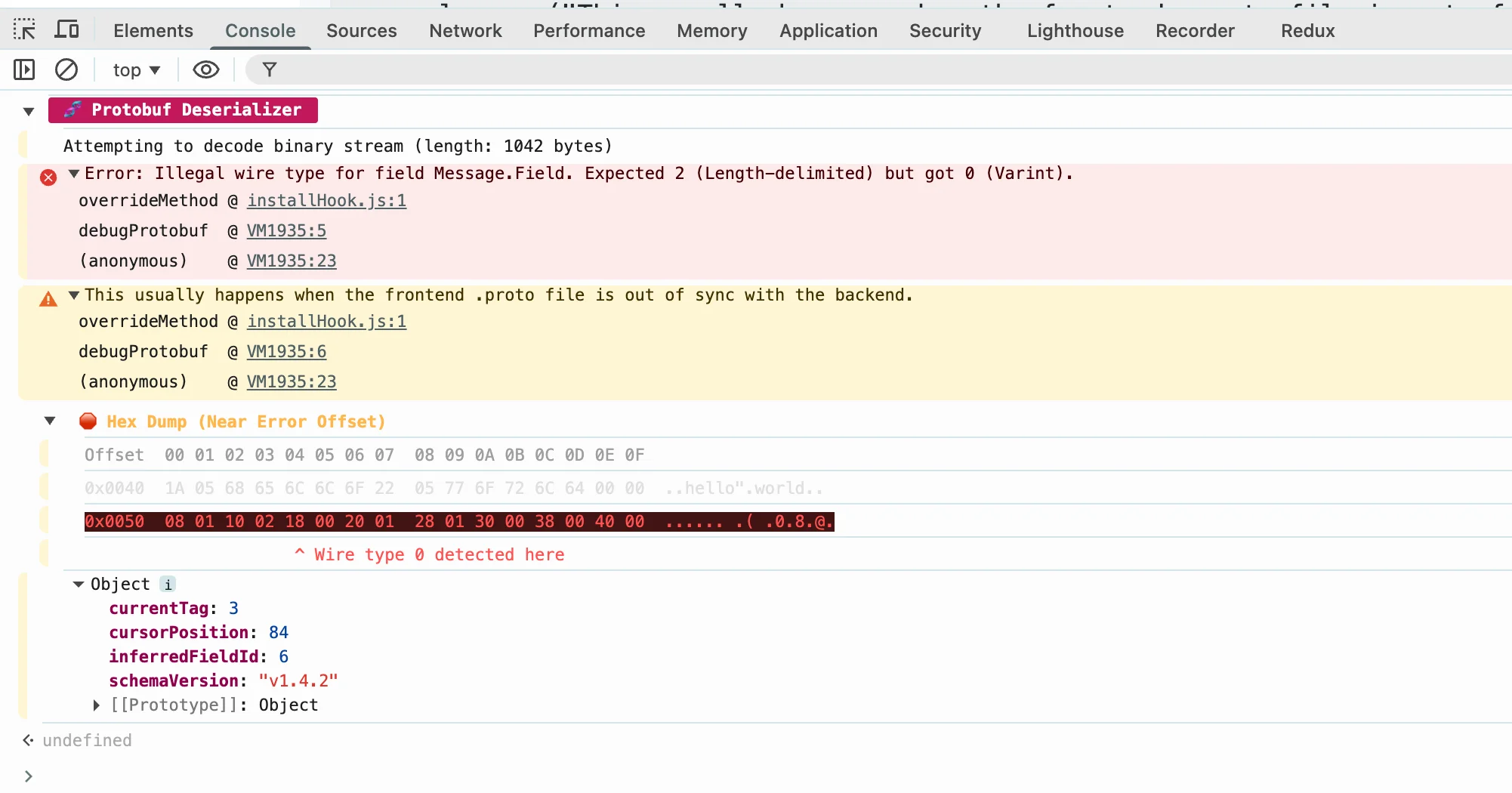
This kind of error usually means the frontend .proto file is out of sync with the backend. A classic rookie mistake that wastes hours.
Honestly, the official documentation reads like gibberish, with zero mention of edge cases - I had to figure everything out step by step with console.log.
3. Length-prefix issues
For strings and bytes, the length is encoded before the data. If those get out of sync, you get truncated strings or extra garbage at the end.
Fix: Re-encode from source if you suspect corruption.
The Workflow That Works
When debugging:
- Capture the raw bytes as hex
- Paste into visualizer, see field numbers and values
- If you have the schema, use protoc to decode with field names
- Compare what you're sending vs. what you expect
Most bugs reveal themselves in step 2 or 3.
Performance Issues
Protobuf is usually fast. If it's not:
- Check if you're decoding eagerly when you only need one field (lazy decoding helps)
- Reuse message objects instead of allocating new ones each time
- For large streams, use streaming decode
These are usually not the problem though—almost every Protobuf issue I've seen was a data bug, not a performance bug.
When You Can't See the Problem
If you've looked at the decoded data and it still doesn't make sense:
- Add a printf/log line on the producing side to log what it's encoding
- Compare the hex against a known-good message
- Check if something is compressing or encoding the bytes somewhere in between
The problem is usually in the 10% of the flow you haven't looked at yet.
Try the Protobuf Visualizer for quick binary inspection.